Link
Search
Menu
Expand
Document
CityU STC Student Resource Center
Home
STC AI Hub
GitHub and Codespace
Create GitHub Account
Install Git on macOS
Install Git on Windows
Downloading Files in GitHub
Install GitHub Desktop
Getting Started with Codespaces
Accessing GitHub Codespaces
Uploading Files in GitHub
Submitting Your Work in Codespaces
Environment
Install Python 3
Install Node.js and npm
Install Keil IDE
Install Jupyter Notebook on Codespaces
Database
Install MySQL
Install MongoDB
MongoDB Atlas (Cloud)
Install MS SQL Server
Install SqlServer on Mac
Python Basic
Tools
Terminal Text Editors
Install Docker
Install Homebrew
Install Ubuntu
Install VS Code
Install VirtualBox
Installing Kali Linux using VirtualBox
Debugging
Common Technical Issues & Solutions
Are you using Apple Silicon?
Environment Variable
Generating an SSH key
Jupyter Notebooks (.ipynb)
Open Terminal in VS Code
What's the Terminal?
Cloud
AWS Billing & Cost Management
Setup Windows EC2 Instance in AWS
Environment
Install Jupyter Notebook on Codespaces
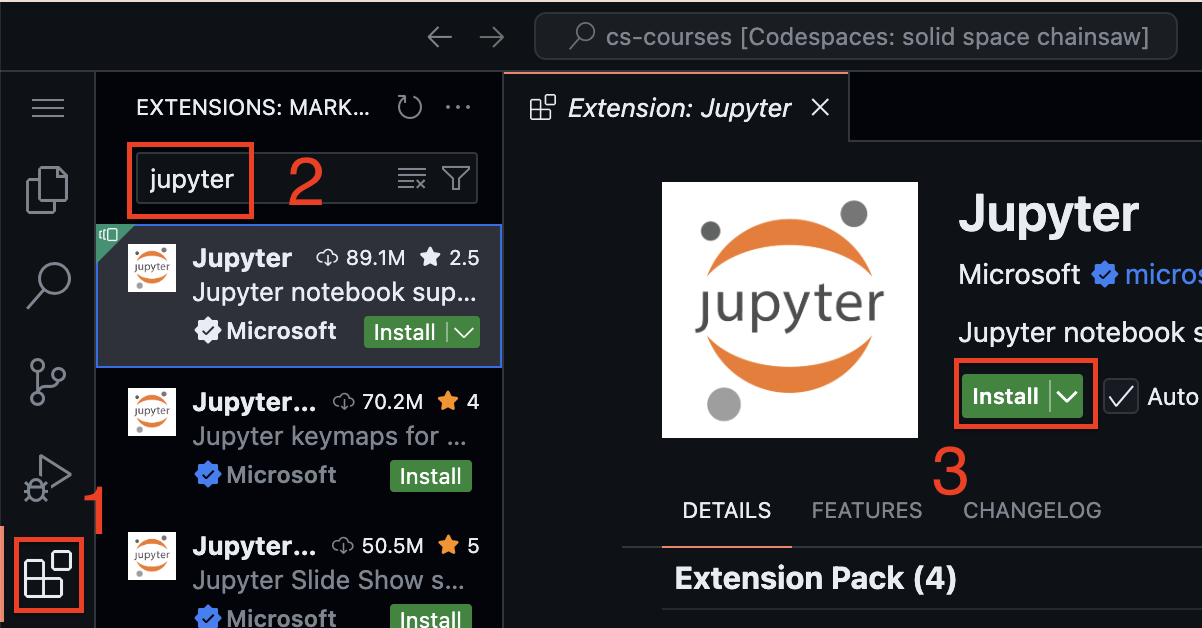
Installing Jupyter Notebook in your Codespaces
In your codespaces, click the extension icon at the left side menu
Search “jupyter”
Click “Install”